![Egg Logo - Coloured Background.png]](https://139813296.hs-sites-eu1.com/hs-fs/hubfs/Egg%20Logo%20-%20Coloured%20Background.png?height=50&name=Egg%20Logo%20-%20Coloured%20Background.png)
1 – App issues
Each manufacturer will provide their own app. If you’re having issues with the app, there’s a couple of simple things you can do to try and resolve these, depending on the exact issues you’re experiencing.
- Force quit or fully close the app and open it again.
- Log out of the app and back in again.
- Check for any updates through your usual app store.
- Remove the app from your device and download it again.
- Check for issues on other devices. Is it only affecting one device, or all that use the app?
If you’re still experiencing issues with the app, the quickest resolution will be to contact the manufacturer directly. As all hardware comes with a dedicated app from the manufacturer, they will be able to advise what the issue is and how you can resolve it. Unfortunately, our teams are unable to investigate issues with manufacturer specific apps.
2 – Individual solar panel generation issue
Depending on the system you have installed and what level of detail is available to view on your system, you may be able to identify that a single panel is causing issues. The example image below is from one of our SolarEdge systems, where users can view individual panel production levels.
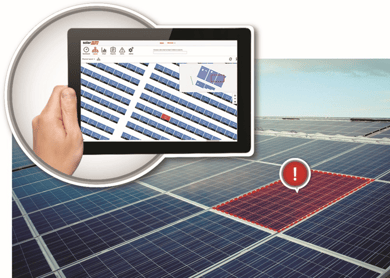
These systems are brilliant to identify when a single panel or a single component may be faulty. If you’re seeing this, get in touch with our team and we will investigate the source of your issues and whether it is covered under warranty.
It’s important to check before contacting us, that there is nothing obstructing this panel, such as shading from a tree of chimney stack. Another example of this could be some debris, such as tarpaulin that has blown away in strong winds and become caught on your solar panels, blocking only some of them.
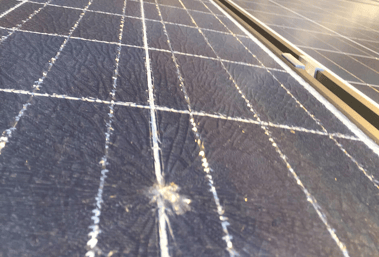
It may be that a single component has failed, which could be covered under warranty. Alternatively, if there is damage to the panel such as cracking which has allowed moisture to enter the panel, this unfortunately wouldn’t be covered under warranty.
3 – Whole system power generation issue
If you don’t have individual panel-level tracking, or the production on your whole system is reduced, it’s always worth checking that there is nothing obstructing the array, such as shading from an overgrown tree.
If there’s nothing obstructing the array and the production is there, but not as high as you’d expect it to be, please contact our team. Depending on the type of system you have, we may be able to remotely troubleshoot on the system or attend site to diagnose.
Due to the number of components and potential failure points, it isn’t always possible to diagnose these issues remotely.
4 – Inverter and overall production issues
Inverter issues generally cause whole system production to stop, or for an error message/light to be displayed on the inverter itself.
The first thing to try if you’ve noticed an issue with your inverter, such as an error message or warning through your mobile app, is to turn it off, wait a few minutes and then turn it back on again. It may take a couple of minutes to fully boot up, however in several instances, a simple reset may solve your issues.
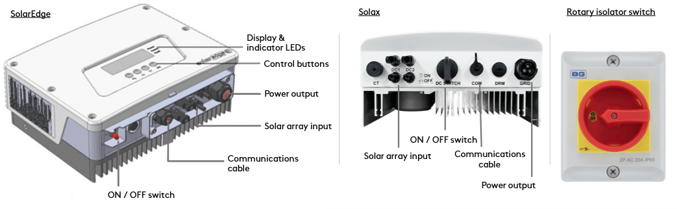
The image below shows an example of a SolarEdge inverter (left) and a Solax inverter (right), with their connections labelled. It’s important that you do not disconnect any of the connections from the inverter, as these could be live. Equally, you must not remove any panels or protective covers.
Both inverters have an ON/OFF power switch on the bottom. Depending on the brand and design of your inverter, this will likely not turn the power off to the inverter completely and won’t allow it to reboot. To reboot the inverter, firstly turn the isolator switch on the inverter itself to the ‘off position’ and then turn the power supply isolator off using the rotary isolator. This will rotate ¼ of a turn to the labelled off position and cut power to the isolator. Once this has been done, wait a minute and then repeat the above process in reverse.
5 – Connectivity/WIFI issues
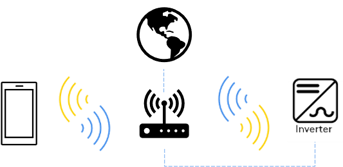
Depending on which inverter brand and model you have, the connectivity options will vary. Inverters are usually connected to your internet router via hardwired ethernet connection, or through WIFI.
Follow the below steps to troubleshoot connectivity issues:
- Are you having connectivity issues with any other device? If you are, this indicates that the problem could be with your internet router.
- Try restarting your internet router. Sometimes, devices can become disconnected from the network. Restarting the router can prompt a device to reconnect and resume normal functionality.
- Try restarting your inverter. This can be done by turning the power off and on again to the inverter through the isolator, or the main power switch on the inverter itself. We’d recommend checking your instruction manual to confirm if your inverter has an integral power switch.