![Egg Logo - Coloured Background.png]](https://139813296.hs-sites-eu1.com/hs-fs/hubfs/Egg%20Logo%20-%20Coloured%20Background.png?height=50&name=Egg%20Logo%20-%20Coloured%20Background.png)
Depending on which charger you are purchasing, you may be presented with the option of either a WiFi connection, or mobile connection. But what exactly is this connection used for?
All our chargers are classed as ‘smart chargers’, which means that you will be able to access and control the charger through a mobile app, see your charging status, costs and set schedules within the charger, as well as much more. For your charger to be able to do this, it needs a stable internet connection.
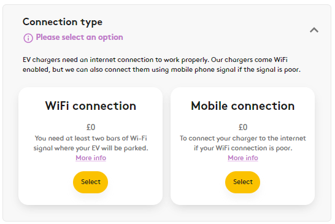
If you were to stand outside your home where your charger is to be located, is your mobile data or WiFi connection stronger? Our mobile connectivity option roams between providers to ensure you get the best connection, however, you do generally need to have at least two bars of signal for this to work properly. This is very similar for the WiFi connection, and we need at least two bars of signal here too.
If you don’t have two bars on either, we’d recommend that you let us know after you have placed the order. We will be able to hardwire your charger to your internet router in most cases, however, to do this we need a spare port on your router and will need to run a cable from the charger location to the router. In most cases, this means running cables inside your property.
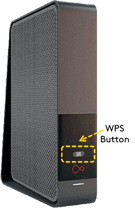
For a WiFi connection to be suitable, we also need your router to have a WPS button. This is very common on most routers and may be a physical button on the front or back of your router, but may also be an option from within your home internet providers mobile app. If you are unsure whether you have one or not, please contact your internet provider to confirm this. If you do not, the powerline adapters may be a great alternative for you.
What are powerline adapters?
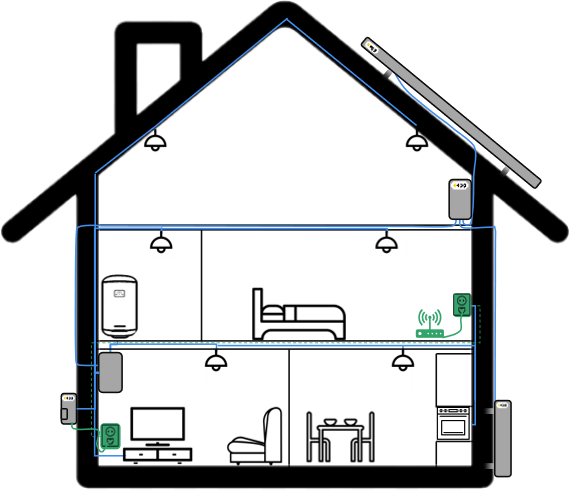
In short, they are an easier and less intrusive option for internet connectivity. It may be beneficial for you to purchase a ‘powerline adapter’ if there is a plug socket inside your property, near your charger’s location. We could then run a short length of cable from the charger, through the wall, and into the powerline adapter. These devices use the electrical wiring in your walls to conduct the internet signal from your internet router to the plug socket near the charger location. This then provides us with an ethernet socket to hardwire the charger to. This means a much shorter hardwired cable route and much less cable running into your property.
In the example below, the internet router is on the opposite side of the property and the WIFI signal at the charger location might not be sufficient. In this scenario, we have connected a powerline adapter to a socket near the router; this then uses your existing electrical cables to transmit the signal. With the second powerline adapter being plugged in on the other side of the wall to where the charger is located, we can drill through and route a cable to the charger, to provide a stable network connection.
Whilst we don’t supply powerline adapter as part of our install, they are widely available at low cost and provide an easy solution when you don’t want cables running inside your home. Our engineers can’t set these up for you, however most are either plug-and-play or come with a simple app to set them up.